

Water Eject iPhone: How to Eject Water from iPhone Using Water Eject Sound & Shortcut (7 Easy Ways)

Water Eject

Water eject sound are the most effective solutions to fix muffled or unclear audio when your device gets wet. Whether your iPhone is exposed to rain, accidental drops in water, or sweat, moisture can easily get trapped inside the speaker grills and affect sound performance. Using advanced techniques like water eject iPhone methods and the water eject shortcut, you can safely remove water from your device within seconds. These methods rely on low-frequency vibrations that help push water droplets out of the speaker system without causing any damage. Instead of waiting hours for natural drying, you can instantly eject water from iPhone speakers using water eject sound or a water eject shortcut, restoring your audio quality quickly and efficiently. In this detailed guide, you’ll learn how to eject water from iPhone step-by-step, along with expert tips, proven techniques, and smart solutions to protect your device

What Is Water Eject Sound?

water eject sound real or fake

Water eject sound isn’t just random noise. It’s a carefully designed low‑frequency vibration that helps clear trapped droplets from your iPhone’s speakers.

Here’s how it works:

 – Your iPhone plays sound waves in the 150–200 Hz range.

 – These vibrations shake loose the water.

 – Droplets are pushed out through the speaker grills.

Think of it like shaking water off your hands — but happening inside your phone, safely and effectively .

Why Water Gets Stuck

Water doesn’t just slide out of your iPhone speakers because:

 – The fine mesh traps droplets.

 – Surface tension holds them in place.

 – Waterproof seals slow evaporation.

 – Dust mixed with water can block sound.

Real‑life scenarios? Rain, workouts, humid weather, or a quick dip in the sink. In all these cases, the water eject method is your best friend.

how to fix a water damaged phone hero 1081x1081

Signs You Need Water Eject

You’ll know your speakers need help if:

  • Sound is muffled or unclear.
  • Volume stays low even at max.
  • Audio crackles or distorts.
  • Voice recordings sound blocked.

If shaking your phone improves sound temporarily, that’s a clear sign water is still inside.

Water Eject Shortcut

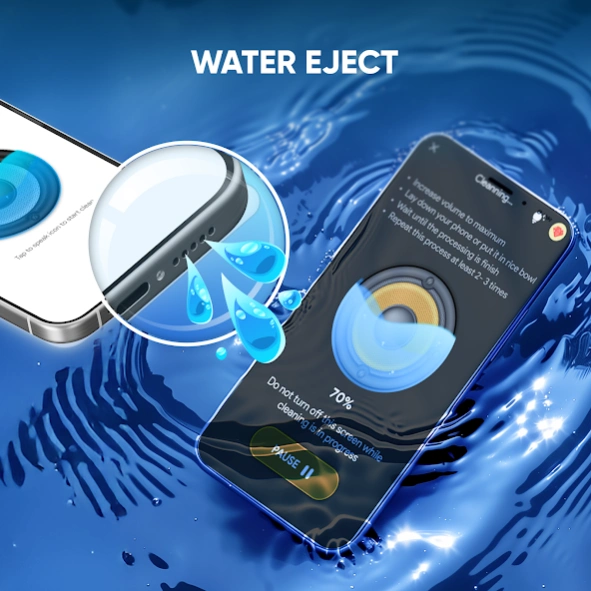
The most reliable option. Just install a trusted shortcut in the Shortcuts app, run it at full volume, and hold your phone face‑down. In 30 seconds, you’ll hear the difference.

Play Water Eject Sound Online

Don’t want to install anything? Search for “water eject sound iPhone,” play it at full volume, tilt your phone downward, and let it run for 30–60 seconds. Quick and easy.

Siri Command

Hands‑free option: just say, “Hey Siri, run water eject shortcut.” Siri will trigger the sound automatically.

Combine Methods

For stubborn moisture, combine techniques:

  • Play the sound.
  • Tap your phone gently.
  • Let it air dry.

Sound loosens the water, gravity helps it escape, and airflow finishes the job.


Manual Support

Hold your phone speaker‑side down, tap it lightly against your palm, or shake gently. Just avoid aggressive shaking — that can cause damage..

Air Drying

If shortcuts don’t fully work, place your phone in a dry, ventilated spot. It’s slower but safe.

Silica Gel (Better Than Rice)

Forget the old “put it in rice” trick. Silica gel packets absorb moisture faster, cleaner, and more effectively…

Benefits of Water Eject Sound

Immediate Benefits

Restores clear audio instantly: Within seconds, muffled or distorted sound becomes crisp again, making calls, music, and videos enjoyable.

Removes trapped moisture: The vibrations push out droplets that would otherwise linger and block sound.

Improves microphone performance: Water can affect not just speakers but also the mic. Ejecting moisture restores clarity in voice recordings and calls.

Saves time: Instead of waiting hours for natural drying, you can fix the issue in under a minute.

Reduces panic: Knowing there’s a quick fix helps you stay calm after accidental water exposure.

Long‑Term Benefits

Prevents corrosion: Moisture left inside can corrode delicate circuits. Ejecting water quickly reduces this risk.

Protects speaker quality: Consistent use of water eject sound ensures your speakers maintain their original clarity and volume over time.

Extends device life: By preventing internal damage, you’re effectively prolonging the lifespan of your iPhone.

Avoids costly repairs: Speaker replacements or water damage fixes can be expensive. Using this method helps you avoid unnecessary trips to the service center.

Maintains resale value: A phone with clear audio and no water damage fetches a better price if you ever decide to sell or trade it in.

Additional Hidden Benefits

Eco‑friendly solution: No need for external gadgets or risky heating tools — just sound waves.

Works across devices: Beyond iPhones, similar sound‑based methods can help with Apple Watches, AirPods, and other water‑resistant gadgets.

Peace of mind: Having a reliable method at your fingertips means you don’t have to worry every time your phone gets wet.

Boosts confidence in water resistance: While iPhones aren’t waterproof, knowing you can eject water safely makes everyday use less stressful.

Mistakes to Avoid

-Using heat tools – blow dryers or ovens can overheat and damage internal components.

-Charging a wet phone – electricity plus moisture risks short‑circuiting and permanent damage.

-Poking objects into the speaker – cotton swabs, pins, or paper can push water deeper or tear the mesh.

-Ignoring muffled sound – waiting too long allows corrosion to set in.

Shaking aggressively – strong force can harm delicate parts instead of helping.

-Relying on rice – outdated, messy, and less effective than silica gel.

-Skipping repeat runs – one cycle may not clear all moisture; repeat for best results.

pad screenshot o4h7l0j4b1

Safety Tips

Always use full volume – the water eject sound works best when played at maximum volume, ensuring strong vibrations to push moisture out.

Keep your phone angled downward – gravity helps droplets escape through the speaker grills instead of settling deeper inside.

Use trusted shortcuts only – avoid random downloads; stick to verified water eject shortcuts to protect your device from malware or faulty scripts.

Repeat the process if needed – one run may not clear all moisture; running it 2–3 times ensures better results.

Avoid charging until dry – even if sound improves, wait until you’re sure the charging port is moisture‑free before plugging in.

Dry in a ventilated space – airflow speeds up evaporation; avoid humid rooms or sealed containers.

Pair with silica gel – after using the sound, place your phone near silica gel packets to absorb any remaining moisture.

Handle gently – tapping or shaking should be light; aggressive movements can damage internal parts.

Stay patient – don’t rush with risky methods like heat guns or hair dryers; safe drying takes a little time but protects your phone.

Check audio after each run – play music or make a quick call to confirm clarity before assuming the problem is solved.

FAQ'S

Q1: Can water eject sound damage my speakers? No. The sound operates in a safe frequency range designed to vibrate water out without harming the hardware.

Q2: Is rice still a good option? Rice is outdated. It’s slow, messy, and can leave dust inside your phone. Silica gel packets are cleaner and more effective.

Q3: What if water is inside the charging port? Do not plug in your charger. Let the port air dry or use silica gel. The water eject sound only works for speakers, not charging ports.

Q4: Can I use this method on other devices? Yes — Apple Watches and some Bluetooth earbuds also benefit from water eject sounds, though shortcuts may differ.

Prevention Tips

how can i protect my phone from water damage banner

Use a waterproof case – if you’re often outdoors, traveling, or near water, a waterproof case adds an extra layer of protection against splashes, rain, or accidental drops.

Avoid charging in humid environments – condensation can sneak into the charging port or speakers. Always charge in a cool, dry place.

Keep silica gel packets handy – store a few in your bag, drawer, or car. They absorb moisture faster and cleaner than rice, making them a reliable backup.

Don’t test water resistance unnecessarily – Apple’s water resistance rating is meant for accidental exposure, not swimming or prolonged submersion. Treat it as a safety net, not a challenge.

Be mindful during workouts – sweat and humidity can seep into speaker grills. Wipe your phone regularly and avoid keeping it in pockets where moisture builds up.

Protect your phone in rain – even light drizzle can cause water to accumulate. Use a zip‑lock pouch or waterproof sleeve when outdoors.

Avoid bathroom use – steam from showers can condense inside the phone. Keep your device away from high‑humidity areas.

Check pockets before washing clothes – one of the most common accidents is leaving a phone in jeans or jackets that go straight into the washing machine.

Handle with dry hands – wet or sweaty hands increase the risk of slipping and accidental water exposure.

Regularly clean speaker grills – dust mixed with moisture can block sound. Use a soft brush or cloth to keep them clear.

Real‑Life Story

Imagine this: you’re at the gym, your iPhone slips from your pocket, and sweat plus humidity block the speaker. You ignore it, thinking it’ll dry on its own. A week later, corrosion sets in, and the speaker permanently loses clarity.

Now compare that to someone who immediately runs the water eject shortcut, tilts the phone downward, and pops it into a silica gel pouch. Within minutes, the sound is back to normal — and the speaker stays healthy long‑term.

Acting fast makes all the difference.

.

Advanced Insight: Why Frequency Matters

The magic lies in the frequency range.

  • Below 150 Hz: vibrations are too weak to push water out.
  • Above 200 Hz: vibrations become harsh and risk damaging delicate components.
  • 150–200 Hz sweet spot: strong enough to eject droplets, gentle enough to protect hardware.

This is why shortcuts and online sounds are carefully tuned — they balance effectiveness with safety

Conclusion

Water in your iPhone speaker doesn’t have to spell disaster. With the right methods — shortcuts, sound frequencies, gentle manual techniques, and silica gel — you can restore your audio in minutes.

The key is acting fast and using safe, proven approaches. By following this guide, you’ll know exactly how to:

  • Spot the signs of water damage.
  • Use the water eject shortcut effectively.
  • Avoid common mistakes.
  • Protect your device for the long run.

Your iPhone deserves clear sound — and now you know how to get it back.

Best Powerful Wheon.com Business Ideas for Beginners in 2026

Best Powerful Wheon.com Business Ideas for Beginners in 2026

Introduction – Why Wheon Matters in the Digital Economy Wheon.com business ideas have become a trusted starting point for anyone...
by ssh685693@gmail.comMarch 28, 2026
Water Eject iPhone: How to Eject Water from iPhone Using Water Eject Sound & Shortcut (7 Easy Ways)

Water Eject iPhone: How to Eject Water from iPhone Using Water Eject Sound & Shortcut (7 Easy Ways)

Water Eject Water eject sound are the most effective solutions to fix muffled or unclear audio when your device gets...

by ssh685693@gmail.comMarch 17, 2026
Affiliate Marketing Success Guide: Meaning, How It Works, Amazon, Meesho, Courses, Jobs and Apps

Affiliate Marketing Success Guide: Meaning, How It Works, Amazon, Meesho, Courses, Jobs and Apps

Introduction to Affiliate Marketing https://adarshstudent.in/wp-content/uploads/2026/03/AFFILIATE-MARKETING-1.mp4In today’s digital-first economy, one of the most accessible ways to earn online is through commission-based...

by ssh685693@gmail.comMarch 16, 2026
Sanju Samson 2.0 Inspiring Biography, Age, Stats, IPL Career, Wife & CSK Trade News

Sanju Samson 2.0 Inspiring Biography, Age, Stats, IPL Career, Wife & CSK Trade News

Sanju Samson: Biography, Age, Stats, IPL Journey, Wife, CSK Trade News & More Introduction Introduction Sanju Samson is one of...

by ssh685693@gmail.comMarch 9, 2026
Mexican Army Kills El Mencho

Mexican Army Kills El Mencho

The Rise, Rule, and Global Consequences of Mexico’s Most Feared Drug Lord The reported death of Nemesio Oseguera Cervantes —...

by ssh685693@gmail.comMarch 5, 2026
Mental Health And Self Care Practises

Mental Health And Self Care Practises

Building Emotional Strength in a Fast-Paced World Modern life often feels like a constant sprint. Between professional responsibilities, academic pursuits,...

by ssh685693@gmail.comMarch 4, 2026

Leave a Comment

Your email address will not be published. Required fields are marked *